

GitHub SSO using password-protected SSH keys
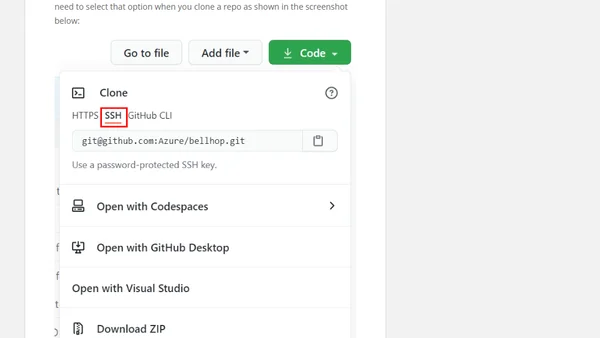
Read OriginalThis article provides a step-by-step tutorial on configuring SSH keys for GitHub, specifically focusing on using password-protected keys and enabling Single Sign-On (SSO) authorization. It covers generating SSH keys, adding them to a GitHub account, cloning repositories via SSH, and troubleshooting push failures due to missing SSO and password protection. The guide is aimed at developers and sysadmins working with secure GitHub access in organizational settings.
Comments
No comments yet
Be the first to share your thoughts!
Browser Extension
Get instant access to AllDevBlogs from your browser
Top of the Week
1
The Beautiful Web
Jens Oliver Meiert
•
2 votes
2
When your coding agent doesn’t understand your project, you’ll get junk
Benjamin Cane
•
1 votes
3
LLM Use in the Python Source Code
Miguel Grinberg
•
1 votes
4
Wagon’s algorithm in Python
John D. Cook
•
1 votes
5
An example conversation with Claude Code
Dumm Zeuch
•
1 votes